Sunday, 7 February 2016

Solve No Messages Notification Problem In Whatsapp Without root .

How to Fix No Messages and Notification Problem in Whatsapp ? 

Do you have Notification problem in whatsapp ? and Do you receive whatsapp mesages late ? if yes then you are at right place . Today we are here with a guide on how to fix Delay messages problem in whatsapp

Whatsapp is the largest social messaging app used worldwide . recently whastapp officials released a report in which they said that now whatsapp has crossed 1 billion user base . The best part about whatsapp is that it is available for almost every OS , But also there is a bitter truth of whatsapp that many users are facing late messages delivery problem in whatsapp . Some reported that they get messages only when they open whatsapp . So today we are here with a solution of Whatsapp notifications problem


fix-no-notification-messages-problem-in-whatsapp

How to Fix Late Whatsapp Messages Notification Problem ? 

Before going to the guide lets have a look at some of the main reasons of the cause of No notification problem in whatsapp :- 

Task Manager :- 

Sometimes users install third party task managers to get more ram space , The moment when they kill all tasks whatsapp also gets closed . And that's why they don't receive whatsapp messages on time and until they open whatsapp .

So the solution to this problem is :- just add whatsapp in exception list in your task manager .

Force Stop :- 

Now a days android smartphone's come with Force Stop feature which not only increase the speed of smartphone but also make a big effect on the battery life . So when you press the home or menu button and force stop all apps the whatsapp application also gets force stopped .

Here is How to fix that :- Just drag down the whatsapp application and lock it from Force stopping .

Solution For Whatsapp messages Notification problem .

  • First of all Download Push Notification App From Playstore.
  • Let the App Install .
  • After installing Open the Push Notification Fixer App .
  • Now After opening the App you will see many options .
First of all Choose
fix-no-notification-messages-problem-in-whatsapp
  • Mobile heartbeat interval and set it to 3 Minutes .
fix-no-notification-messages-problem-in-whatsapp

  • Then choose Wi-fi Heartbeat interval and set it to 2 Minutes .
  • After doing both the above steps tap on apply settings .
fix-no-notification-messages-problem-in-whatsapp
  • Now just make a reboot of the device to make the changes take effect .
And that's all !!! you have successfully solved the no notification problem in whatsapp without root .

So this was our guide on how to solve no messages notification problem in whatsapp .

How To Enable Slow Motion Recording On Apple Iphone 4 And Iphone 4S .

Activate Slow Motion Recording On Apple Iphone 4 and Iphone 4S .

Do you want to Record Slow Motion Videos on Your iphone 4 and Iphone 4s ? if yes then you are at right place . Today we are here with a guide in which will tell you the way to Activate Slow motion recording on your apple iphone 4 and 4S .

Apple iphone 4 And 4s are little bit outdated devices . And just because of that Developers have stopped Software support for both devices , And not only software but Hardware of 4 And 4S is also Outdated and thats the biggest reason why it doesn't support one of the most popular Slow motion recording feature IOS . So today we are here with a Guide on How to Activate Slow Motion Video Recording on Apple Iphone 4 and Iphone 4S .

How to Know If your Apple Iphone is Original or Duplicate ?

slow-motion-video-recording-on-apple-iphone-4-iphone-4s

How to Record Slow Motion Videos On Apple Iphone 4 And 4S .

Before going to the guide Here are Some prerequisites that you have to do :- 

  • Your Apple Iphone 4 And 4S should Be Jailbreaked to Enable The Slo-Mo recording Feature .
  • The Minimum Battery Percent should be 60% .
  • Working internet Connection .

Guide :- 

  • First of All Download The Slo-Mo Mod From Here
  • Now Install This by using Cydia .
  • After installing the Slo-Mo mod on your apple iphone 4s and iphone 4 you will be able to record slow motion videos .

Features of Slo-Mo Mod :- 

  • You can set the maximum Slow Motion Frames Per second .
  • You can Convert any video to Slow motion video .
  • Set Slow motion Factor .
  • Set the Speed of Video .
  • You can hide the Fps indicator while recording .
How to use Whatsapp Web With a Apple Iphone . 

Screen Shots of the Slow motion recording on Apple Iphone 4 And Iphone 4s :- 

slow-motion-video-recording-on-apple-iphone-4-iphone-4s

slow-motion-video-recording-on-apple-iphone-4-iphone-4s

slow-motion-video-recording-on-apple-iphone-4-iphone-4s

slow-motion-video-recording-on-apple-iphone-4-iphone-4s
 
So by installing the Above Slo-Mo mod you will be able to record Slow motion videos on your Apple iphone 4 and Iphone 4s Without any problem .However some times it is also possible that the camera of the Phone will stop working , So in that case simply turn off the phone for 2 minutes and then turn it on back .

This was our guide on How to Record Slow motion videos from Apple iphone 4s And Iphone 4 .

Saturday, 6 February 2016

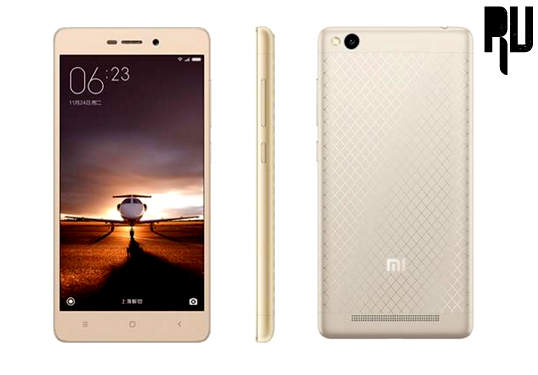
How to Root Xiaomi Redmi 3 Without Pc .

Root xiaomi redmi 3 without using computer .

Do you want to Root Xiaomi redmi 3 without using Pc ? If yes then you are at right place . Today we are here with a guide in which we will tell you method to root Xiaomi redmi 3 by using android app

Xiaomi redmi 3 is the successor of the Xiaomi redmi 2 prime which was one of the most selling device worldwide . Redmi 3 is the very first device from xiaomi in the year 2016 in the Budget level segment . Before going to the Rooting Redmi 3 guide let us have a Quick look at the specifications . Xiaomi redmi 3 comes with a 5 Inch Hd Display ( 720X1280) with a Pixel density of 244 Pixels per inch . 

Xiaomi redmi 3 Comes with a 1.7Ghz Qualcomm Snapdragon 616 Octa core processor Coupled with 2Gb ram which makes the smartphone Capable of Heavy multitasking and gaming .

The redmi 3 comes with 13 Mega pixel rear camera , This is the biggest upgrade over the redmi 2 prime which used to come with 8 Mp primary camera . At front there is a 5 mega pixel camera for Good and clear selfies . for Storage there is a 16 Gb internal storage which can be further expanded upto 128 Gb by using a Memory card . 


The best thing about the xiaomi redmi 3 is its massive 4100 Mah battery Which can last upto 2 days with heavy usage . 

Okay so Heading towards our Guide on How to root Xiaomi redmi 3 without using computer .

root-xiaomi-redmi-3-without-using-computer

How to Root Xiaomi redmi 3 Using App .

So In this guide we will use a android Rooting application to root Xiaomi redmi 3 . Before rooting the redmi 3 Below are some Prerequisites you need to do :- 

  • Make sure that redmi 3 is minimum charged to 60% .
  • Make a Backup of all your Important files and contacts .
  • After rooting Redmi 3 your warranty will get voided , However you can get it back by unrooting .
Okay now Starting with the Rooting Of Xiaomi redmi 3 .

Rooting Procedure Of Xiaomi redmi 3 .

  • First of all Download the Xioami Redmi 3 Apk from HERE .
  • After Downloading .
  • Install the Apk As normal App .
  • Now Go to Developers option .
  • Enable Usb Debugging Mode .
  • After Doing All the Above Steps .
  • Go to App Drawer And open The Redmi 3 Rooting App you downloaded earlier .
  • After opening You will see a Root Option , just press that .
  • After sometime your Xiaomi redmi 3 Will be rooted .
Thats all , You have successfully rooted your Xiaomi redmi 3 Without using pc .

Now to check if your Redmi 3 is rooted or not You can simply download a App from Google Play store named as " Root Checker " to check .

So that was our guide on How to Root Xiaomi redmi 3 without using pc , I hope this guide helped you in rooting your redmi 3 .

Friday, 5 February 2016

LeECo Le1s Vs Xiaomi Redmi Note 3 Pro .

LeTv LeEco Le1s Vs Xiaomi Redmi Note 3 Pro Snapdragon : Comparison Which one is Good ?

Do you to Know a Comparison Between the le1s and Redmi Note 3 Pro ? if yes then you are at right place. Today we are here with a Detailed comparison of The Letv le 1s and Xiaomi Note 3 Pro Indian version .

LeEco Le1s and Xiaomi Redmi note 3 pro both are the newly launched devices However LeEco le1s is Now available to purchase via flipkart whereas the redmi note 3 snapdragon will come to india in March . Surprisingly both Le1s and Note 3 Pro Share almost Same Specifications So it is hard for users to select between The LeEco le1s and Xiaomi redmi note 3 Pro Snapdragon .

Trick to Buy LeEco Le1s Automatically in Flipkart flash sale .

So just to clear doubts and help you in choosing the best between letv le1s and The Redmi note 3 pro Indian version we are here with a quick and detailed Comparison of both devices .
xiaomi-redmi-note-3-pro-snapdragon-indian-version-vs-Leeco-le1s-comparison

 Which One is Better LeEco Le1s Or Xiaomi Redmi Note 3 Pro Snapdragon ? 

As we Mentioned earlier that both smartphones come in same price segment and also shares some identical specifications So it is really hard to choose between them . So lets start a detailed comparison .

Display :- 

Xiaomi redmi note 3 pro :-

The redmi note 3 pro comes with a 5.5 Inch Full Hd display with a Pixel density of 403 Pixels Per inch , The Display is undoubtedly one of the finest display . the best part about the display is that it comes with xiaomi's very own " Sun Light Display "  . The Display supports 10 Fingers at a time . Being a Multitouch smartphone it helps in playing multitouch games without any difficulty .

LeEco Le1s :- 

The LeEco Le1s Comes with a 5.5 Inch Full Hd display With a Pixel density of 401 Pixels per inch . It is also a High definition display Hence it is also capable of playing good Quality of videos . However when compared to the display of redmi note 3 pro it is a way less then its display . The display of le1s also comes with Multi touch suppor with accepting more then 10 Fingers at a time .

So in the Display Comparison of LeEco Le1s Vs Xiaomi Redmi Note 3 Pro Snapdragon = The Redmi note 3 is the winner with More vibrant display and extra Sun Light Display Technology .

Camera :- 

Xiaomi Redmi Note 3 Pro Snapdragon :- 

Xiaomi Redmi Note 3 pro comes with a 16 Mega Pixel rear Camera and A 5 mega pixel front selfie camera .

LeEco Le1s Honest Review .

Rear Camera :- at The rear there is a 16 mega pixel camera  . The technologies used in the camera are :- 

Phase detection .
Aperture 2.0
Dual tone Led Flash 
Geo Tagging 
Autofocus 
Face Detection 
Smile Detection 
HDR 
Panorama .

The best Thing about the camera of Redmi note 3 pro is that it is capable of recording slow motion videos by default . 

Front Camera :- At the front there is a 5 Mega Pixel camera . The front 5Mp camera of Redmi note 3 pro is capable of Capturing a recordinc full HD Images and Videos . in addition there are features like autofocus , Face detetcion and Age detection .

LeEco Le1s :- 

The LeTv Le1s comes with 13 Mp Rear and 5 Mp Front Camera . 

Rear Camera :- 

There is 13 mega pixel primary camera . The camera can autofocus images in just 0.9 second which is seriously amazingly fast . The technologies used in the camera of Le1s are " Phase Detection " and " Autofocus " .

LeEco Le1s Vs Lenovo k4 Note : Comparison .

Front Camera :- 

There is a 5 Mega Pixel Front selfie camera , in addition there are basic features like The Autofocus , Different filters .

So the Winner in Camera comparison of LeEco Le1s vs Xiaomi Redmi note 3 Pro Snapdragon = Redmi note 3 pro is winner with a much larger 16 mp camera and Many features which the le1s still lacks . maybe The camera of The le1s can overcome Redmi note 3 pro in future android upgrades but as of now redmi Note 3 pro is winner .

Hardware and Software :- 

Xiaomi Redmi Note 3 Pro :- 

Xiaomi redmi note 3 Pro comes with Qualocomm Snapdragon 650  2.0 Ghz Hexa Core processor . 4 Cortex A53 cores are clocked at 1.2ghz and Rest 2 Cortex A72 cores are clocked at 1.8ghz . Under hood there is 3gb ram . For Good gaming and Awesome graphics there is a Aderno 510 Gpu Chipset installed . 

There is no doubt that the Xiaomi redmi note 3 pro is capable of handling many apps and performing heavy multitasking without any problem . 

Coming to the Fingerprint scanner , There is a fingerprint sensor located just below the camera . The fingerprint sensor is extremely fast and can unlock the phone in just .3 seconds .

Coming to the software , The redmi note 3 pro comes with xiaomi's Default MIUI 7 Os based on Android 5.0.2 Lollipop .


LeEco Le1s :- 

LeEco Le1s comes with Mediatek Helio x10 processor , Just for your Info. The helio X10 is one of the most powerfull processor from mediatek till date . Leeco le1s comes with 8 cores and each core is clocked at 2.2Ghz . 

Coming to the ram , there is 3Gb ram coupled with Power Vr G6200 Gpu for Hd gaming .

Same Like The redmi note 3 pro There is a Fingerprint scanner .

The Le1s runs on LeEco's Default Ui " Eui 5.5 " Based on Android 5.1 lollipop . 

So the winner in the Hardware and Software Comparison of Xiaomi Redmi note 3 Pro Snapdragon vs LeEco le1s = LeEco le1s is winner with much more powerfull processor and more cores . 


Battery :- 

Xiaomi Redmi note 3 Pro :- 

Redmi note 3 Pro comes with a 4000 Mah non removable battery . 

LeEco Le1s 

Le1s comes with a 3000 Mah non removable Battery . 

So the winner in the battery comparison of redmi note 3 Pro Snapdragon vs LeEco Le1s = Redmi note 3 pro is winner with much bigger battery .

Xiaomi Redmi note 3 Pro Indian Version Vs LeTv LeEco Le1s : Final Verdict .

So this was our detailed comparison on the mid range flagship devices . Both smartphones are undoubtedly awesome and we dont found any major difference between the redmi note 3 Pro and Le1s . However just for a quick suggestion , If you want more performance from your smartphone then go with The LeEco le1s and if you want more bigger battery life and awesome photography then Xiaomi redmi note 3 pro is undoubtedly the perfect handset for you . 

So this was our guide on LeEco Le1s Vs Xiaomi redmi note 3 Pro Snapdragon Indian Version .

Thursday, 4 February 2016

Trick to Buy LeEco Le1s Automatically in Flipkart Flash Sale

How to add Letv LeEco Le1s automatically In Cart in Flipkart Flash sale .

Do you want to buy LeEco Le1s Automatically and want to add in your cart on Flipkart in Flash sale ? If yes then you are at Right place . today we are here with a trick in which we will tell you a way to put Le1s automatically in to cart in flash sale .

LeEco Le1s is a recently launched smartphone from the Chinese manufacturer " Letv " . The le1s was the very first handset from the company in india and surprisingly the company got a huge response By receiving more then 2 Lakhs registrations on the very first day . and it is also worth mentioning that the Smartphone got out of stock in just 2 seconds with having more then 70,000 Units . Just because of the huge demand of the smartphone many users get disappointed when they cant add The Letv LeEco Le1s in the cart on flash sale day in flipkart . So we thought to share a Trick with which you will be able to add the Le1s automatically in the cart on flash sale day .

How to Buy LeEco Le1s From Flipkart in Flash Sale .

Okay so we will use A Extension to Put LeEco Le1s in Cart . 

So starting with the Guide :- 

First of all Download The Extension to Add LeEco Le1s automatically in cart from Here .

How to Put LeEco Le1s in Cart on Flipkart in Flash sale .


Choose ADD TO CHROME option .

how-to-add-lenovo-k3-note-in-cart-automtically-on-flash-sale-day


A pop up will appear on The screen To Confirm The action , Tap On Add the Extension .

tric-to-buy-lenovo-k3-note-automatically-on-flash-sale-day


Now Let the Extension File Complete downloading , after downloading you will see a FS icon on The right side .

Put-letv-leeco-le1s-in-cart-automatically-flipkart-flash-sale

Just Tap on That and choose register for Next LeEco Le1s  sale .

LeEco Le1s Vs Lenovo K4 Note : Comparison .

Put-letv-leeco-le1s-in-cart-automatically-flipkart-flash-sale

Choose yes For Do you Want to opt-in for Next LeEco Le1s Sale ?

Now in second question it depends upon you whether you want to Checkout your self , if you want to checkout yourself then Choose 

Add to my cart . i'll checkout myself 

And you want Flipshope to do All work then Choose 

i am too busy . Please Check out for me . And fill in the following details 

automatically-add-to-cart-lenovo-k3-note


After the Successful registration  you will se a pop up showing :- 

how-to-buy-lenovo-k3-note-on-flash-sale-day-first-flash-sale

And thats all , Now just open your Laptop or pc right 5 minutes before the staring of the flash sale . 

See The Video Tutorial :-   


So this was our guide on how to add LeEco Le1s in Cart , i hope this guide helped you in adding the Letv leEco le1s automatically into your cart in flipkart flash sale .

Huawei Honor 5X Review .

Huawei Honor 5x Honest Review .

Planning to Buy Huawei Honor 5x ? And Want a Honor 5x Review ? Then you are at right place . Today we are here with a Honest review on The newly launched Honor 5x Smartphone

Huawei honor 5x is a successor of the Honor 4x which was Launched  in October 2014 and now after approx 1 year the company launched The Successor with High end specifications and a Lower Price tag . The smartphone is launched at the same time when other big players like Lenovo,Leeco and Xiaomi launched their handsets in the market . The smartphones shares almost all identical features to k4 note ,le1s and note 3 so users get confused on which smartphone should they buy . So today we are here with a Review Of Huawei Honor 5x .
Huawei-Honor-5x-Review

Honor 5x Review , Specifications , Price in india .

So starting with the Review of the Honor 5x :- 


Display :- 

The Honor 5x comes with a 5.5 Inch Hd Display with a Pixel density of 401 Pixel per inch Coupled with a resolution of 1920X1080 . The Display of Huawei Honor 5x is one of the best display in the sub 12k segment smartphones . 

The display allows you to use multi fingers on The screen , Being a Multitouch smartphone it helps you in getting a good gaming experience . 

There is no confirmation on the protection part of the screen but according to some sources the screen comes with a Layer of Corning gorilla glass 3 . 

Hardware :- 

The honor 5x Comes with a Qualcomm Snapdragon 615 octa core processor . There is  aSet of 2 Quad core processors Clocked at 1.5Ghz and 1.2Ghz Making it a 1.7Ghz Processor .

Coming to the ram , The Honor 5x comes in 2 variants having 2gb and 3gb ram However its is totally upon the users which variant they prefer to buy . 

For better gaming there is a Aderno 405 Gpu that can handle almost every graphic .


Camera :- 

There is a 13 Mega pixel Primary camera which comes with autofocus and Led flash . Being a 2.0 Aperture camera we can expect Good and detailed images from the camera . 

At the front there is a 5 mega pixel camera that can capture good selfies , in addition there are several types of filters which help in capturing images in different Styles .

Battery :- 

The Huawei Honor 5x comes with a 3000 mah Battery , as of now there is no information about the battery performance of the Honor 5x . However being a 5.5 Inch Smartphone with heavy processor cant expect good performance from the device .

Color :- 

The Huawei Honor 5x Comes in 2 Different colors , The silver and Grey . 

Price :- 

As we already mentioned that Honor 5x comes in two variant so the 16Gb + 2GB ram variant is priced at a cost of 12,999 . The price of The 3Gb ram Variant is still Not revealed .


Extras :- 

  • Fingerprint Sensor :- The Honor 5x comes with a Fingerprint scanner placed at back which can unlock the smartphone in just 5 seconds .
  • Accerlometer .
  • Proximity 
  • Compass 

Huawei Honor 5x Review - Final Verdict .

Huawei honor 5x is undoubtedly one of the best smartphones we have seen so far . But the biggest drawback is its 13K price tag which is a way more then its competitor . However if you have a good budget and want a smartphone that can handle almost all tasks for you , Then the Huawei Honor 5x is the perfect choice for you . 

So this was our Review of Huawei Honor 5x , I hope this review helped you .

Wednesday, 3 February 2016

Lenovo K5 Note Price Specifications .

Lenovo K5 Note Price Specifications Features And Launch Date .

Lenovo announced the launch of yet another killer note in January 2016. Starting this year, there were lots of rumors surrounding the Lenovo K5 Note specifications but finally all our questions were answered. In the motherland of the company, the new Lenovo k5 note was unveiled. Let's have a look at all its specifications completely. The Lenovo K3 Note is one of the most successful phones followed by the Lenovo K4 launched last year. Lenovo is famous for its budget smartphone and they do their best to present us with a phone that is the jack of all trades.

Lenovo-k5-note-price-specifications-launch-date

Lenovo K5 Note Features And Specifications .

Although there is no word from Lenovo about the official launch of the phone worldwide but we should always keep our hopes high. Let's dig straight into what are the upgrades you can see in the brand new Lenovo K5 Note. Unless like the predecessors, the New K5 note has a full metal body and a shiny new Finger Print scanner. The finger print scanner is one of the most valuable thing in the growing  smartphone market as it provides the best security option. Moving on to the processor, its 1.8 GHz octa core Helio P10 Mediatek which is backed up by the 2GB RAM provided inside the Lenovo K5 Note . The phone DOLBY ATOMS speaker just like the previous Note K4. The sound on the new Lenovo Note K5 would be really exciting paired with any ordinary headphones or earphones. The phone comes with a 5.5 inch full HD i.e. 1080x1920p IPS display which is crystal clear and bright. However we don't have a word on the ppi yet. The camera on the back is a 13mp  PDAF auto focus camera with 2.2 aperture with dual LED flash light. The front camera is a huge 8MP camera which let's you capture the perfect selfies. The phone has the lollipop based operating system and its powered by a 3500 mAh battery. The internal ROM is of 16 GB. 


Lenovo-k5-note-price-specifications-launch-date
The phone is will be available via flash sale in China and we hope to hear back from Lenovo about its world wide release soon. The phone is selling for CNY 1099 .

So this was our Guide on The Newly Launched Lenovo K5 note , I hope you liked it .